Many site owners put most of their effort into keywords, content strategy, and link building, but overlook a technical factor that quietly shapes their search visibility: their hosting environment.
Search engines need websites to be consistently accessible, fast, and secure in order to crawl and evaluate them properly. If your infrastructure struggles with speed, downtime, or security issues, even high-quality content can lose ranking opportunities.
This SEO hosting checklist explains the hosting features that support technical SEO performance, along with simple ways to verify whether your hosting actually delivers what it promises.
If you are evaluating seo optimized hosting or considering moving to fast hosting for SEO, these infrastructure factors should be part of your decision.
Why Hosting Infrastructure Matters for SEO
Search engines reward websites that deliver a stable, fast, and secure experience. Your hosting provider directly affects technical signals that influence rankings, crawlability, and user engagement.
Reliable hosting for SEO helps ensure search engines can access your content consistently and efficiently.
Hosting infrastructure impacts several critical ranking factors:
- Uptime reliability which determines whether search engines can reach your site when crawling
- Time to First Byte (TTFB) which affects how quickly the server begins responding
- Caching and CDN performance which influence how fast pages are delivered globally
- SSL / HTTPS security which supports trust and safety signals
- Redirect handling which helps preserve ranking signals during site changes
- Security layers like WAF which protect against malware and blacklisting
- Backup systems which reduce downtime after incidents
“Site speed is a key part of user experience. When pages load slowly, users are less likely to stay on the site long enough to find what they need.”
Source: Cloudflare
When hosting performance declines, both users and search engines notice.
Who This SEO Hosting Checklist Is For
This checklist is designed for organizations that depend on organic traffic and want infrastructure that supports long-term SEO performance.
It is especially useful for:

- Business websites generating leads through organic search
- eCommerce teams where performance impacts both rankings and revenue
- Marketing teams managing content and SEO campaigns
- Agencies responsible for client migrations or infrastructure decisions
- Site owners planning redesigns or hosting changes
Choosing seo optimized hosting helps ensure technical stability and supports the work your marketing team is doing.
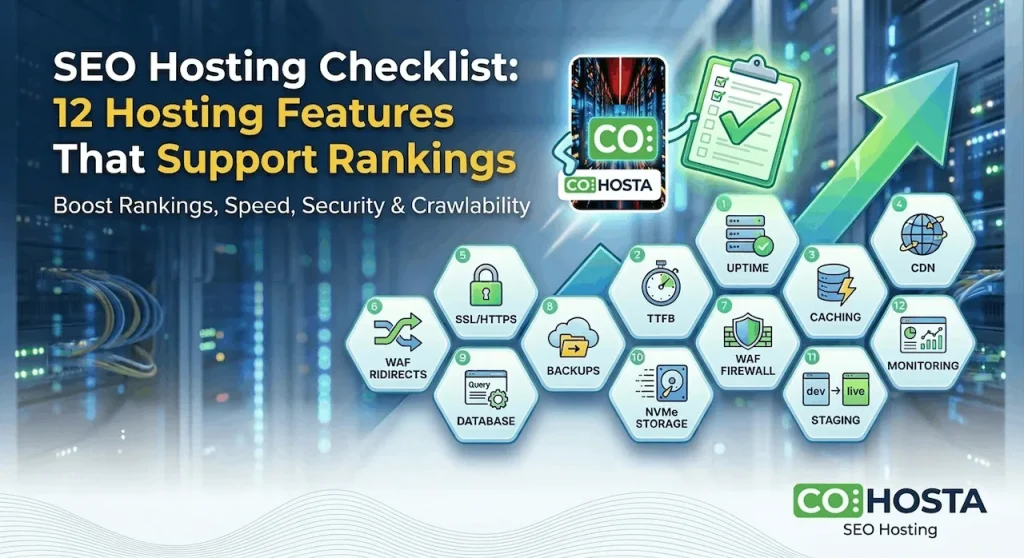
SEO Hosting Checklist: 12 Hosting Features That Support Rankings
1. Uptime Reliability (Stability for Crawling)
If your website frequently goes offline, search engines may crawl your site less often or fail to index updates.
Consistent uptime is one of the most important foundations of hosting for SEO.
Reliable providers include uptime monitoring systems that track availability continuously and alert administrators to outages.
How to verify:
- Check your host’s historical uptime reports
- Implement independent uptime monitoring tools to track performance
- Review server logs for repeated 5xx errors or timeouts
2. Fast Time to First Byte (TTFB)
TTFB measures how quickly the server starts responding after a request.
Slow response times are often caused by overloaded servers, inefficient caching, or poorly optimized infrastructure.
A major advantage of fast hosting for SEO is consistently low TTFB, which improves both page speed and crawling efficiency.
How to verify:
- Test pages with Google PageSpeed Insights
- Compare performance across different geographic locations
- Compare lightweight pages versus database-heavy templates
3. Server-Level Caching
Caching reduces the amount of work needed to generate each page request.
Server-level caching is significantly more effective than relying only on application-level caching plugins.
Quality seo optimized hosting typically includes multiple caching layers such as page caching, object caching, and opcode caching.
How to verify:
- Check response headers in browser developer tools
- Reload the same page and compare performance
- Ask your host which caching layers are active
4. CDN (Content Delivery Network)
A CDN distributes content across global edge servers so visitors and search engines can load assets from nearby locations.
This improves performance for international users and helps ensure consistent speed worldwide.
CDNs are commonly included in fast hosting for SEO environments because they reduce latency and server load.
How to verify:
- Check response headers for CDN indicators
- Test page load times from multiple regions
- Confirm which assets are cached at edge locations
5. SSL / HTTPS Security
HTTPS encrypts traffic between users and servers and has been a ranking signal for years.
Most seo optimized hosting platforms provide automatic SSL issuance and renewal so certificates never expire.
How to verify:
- Visit your site using HTTPS and check for browser warnings
- Confirm certificate expiration dates
- Verify HTTP requests redirect properly to HTTPS
6. Redirect Management
Redirects preserve search rankings when URLs change due to redesigns, migrations, or content consolidation.
Improper redirects can cause lost ranking signals, redirect chains, and crawl inefficiencies.
Reliable hosting for SEO environments supports clean redirect configuration.
How to verify:
- Test redirects using header inspection tools
- Identify redirect chains
- Run a crawl audit to detect broken URLs
For more details on redirect behavior, see MDN’s guide to HTTP redirections.
7. Web Application Firewall (WAF)

A WAF protects websites from malicious traffic, injection attacks, and exploit attempts.
Security issues can severely impact SEO if they result in malware warnings, spam injection pages, or search engine blacklisting.
Many seo optimized hosting providers include managed WAF rules specifically designed for CMS platforms.
How to verify:
- Review firewall dashboards or logs
- Confirm rule sets are actively maintained
- Check whether protection occurs at the network edge
8. Automated Backups
Backups protect SEO progress when unexpected problems occur.
If a site breaks, gets hacked, or experiences data corruption, restoring quickly minimizes downtime and protects rankings.
How to verify:
- Confirm backup frequency, such as daily or hourly
- Check retention policies
- Test a restore process in staging
9. Database Performance
Many SEO-critical pages rely on databases, including product pages, category pages, blog archives, and internal search results.
Database optimization is an important component of fast hosting for SEO because inefficient queries increase TTFB.
How to verify:
- Compare performance between dynamic pages
- Review slow query logs
- Confirm object caching is enabled
10. Modern Storage (SSD or NVMe)
Fast storage reduces server response times and improves overall performance.
NVMe storage can deliver significantly faster data access compared to older disk systems.
High-performance seo optimized hosting platforms typically use NVMe storage to improve backend responsiveness.
How to verify:
- Confirm storage type with your provider
- Monitor disk performance metrics
- Look for slowdowns during traffic spikes
11. Staging Environment
A staging environment allows teams to test updates safely before pushing changes to the live site.
This prevents SEO issues such as broken templates, indexing errors, and redirect problems.
Professional hosting for SEO environments usually includes one-click staging systems.
How to verify:
- Confirm staging creation and deployment tools exist
- Ensure staging environments are blocked from search indexing
- Test updates before pushing them live
12. Monitoring and Performance Visibility
Monitoring provides real-time visibility into infrastructure performance.
Without monitoring, problems often remain unnoticed until rankings decline or users complain.
Many seo optimized hosting providers include dashboards for uptime monitoring, response times, error rates, and resource usage.
How to verify:
- Enable uptime alerts
- Review performance logs regularly
- Investigate unusual spikes in response time
How Hosting Performance Affects Crawlability
Search engines allocate a limited amount of crawl resources to each website.
When your infrastructure is fast and reliable, crawlers can discover and index more pages efficiently.
When hosting performance declines, search engines often reduce crawl frequency.
This can lead to:
- Slower indexing of new pages
- Delayed recognition of updates
- Wasted crawl budget on errors and redirects
Content may drive rankings, but hosting determines whether search engines can reliably access that content.
Choosing SEO Optimized Hosting
Not all hosting environments are designed with SEO performance in mind.
When evaluating providers offering seo optimized hosting, consider these questions:
- Can they demonstrate uptime history with reliable uptime monitoring?
- Do they provide infrastructure designed for fast hosting for SEO performance?
- Are caching and CDN delivery included by default?
- Is SSL management automated?
- Do they support safe redirect management for migrations?
- Is a WAF included to protect search visibility?
- Are backups automated and easy to restore?
Infrastructure choices can quietly influence SEO results for years.
Final Thoughts
Content and backlinks are essential for rankings, but they rely on a stable technical foundation.
Reliable hosting for SEO ensures your website remains fast, secure, and consistently accessible to both users and search engines.
This SEO hosting checklist provides a framework for evaluating whether your current infrastructure supports long-term organic growth.
If you are considering moving to seo optimized hosting built specifically for speed, security, and crawlability, explore Market Leader SEO Hosting.
And if you want help evaluating your current infrastructure, you can request a technical consultation with our hosting specialists.